
TLDR: Spoken Language Identification determines which language is being spoken in an audio signal, before any transcription runs. It works on acoustic features, not on transcribed text. Current systems reach 90 percent or higher accuracy. The choices that decide whether it works in production are accuracy under open-set conditions, latency, and whether the model runs on-device or in the cloud. This guide covers how SLID works, how it is measured, where it fits in a voice pipeline, and how to choose an engine.
This guide focuses on the spoken, audio-first case. For the broader task that also covers text-based language, read our guide to language detection.
What Is Spoken Language Identification?
Spoken Language Identification is the task of automatically detecting which language an unknown speaker is using from an audio clip or live stream, independent of what is said. It is text-independent: the model reads acoustic patterns such as phonemes and prosody rather than transcribed words. That is what separates it from text language detection, which reads characters and word patterns in written content.
The three names in circulation refer to the same thing. "Language identification" and "LangID" are common in academic and NLP literature. "LID" is the short form used in speech research. "Spoken Language Identification" or "SLID" is the precise term when the input is audio.
Why Spoken Language Identification Is Critical for Accuracy
SLID sits at the front of a multilingual voice pipeline. Detecting the language before transcription lets the system pick the correct speech-to-text model, translation engine, or voice handler instead of running every language model at once or guessing and paying for it downstream. If Spoken Language Identification detects the language incorrectly, every downstream stage inherits the error.
Spoken Language Identification vs Language Detection
Language detection is the umbrella term. It covers both written text and spoken audio. Spoken Language Identification is the speech-only branch of it.
Text language detection analyzes characters, word combinations, and statistical features such as n-gram frequency. It works on documents, messages, and web pages. Spoken Language Identification analyzes acoustic features directly from audio, so it can label the language before a single word is transcribed. The two solve the same problem in different signal domains, and they use different models to do it.
If you are working with written content or want the full picture across both domains, start with the language detection guide. If your input is a microphone or an audio file, Spoken Language Identification is the right tool, and the rest of this page is about it.
How Does Spoken Language Identification Work?
A spoken language identifier turns raw audio into a language label in three stages: feature extraction, modeling, and decision. Audio is first converted into a spectral representation, usually a mel-spectrogram or MFCC features. A neural network then maps those features to a language, and the system returns a language code with a confidence score.
Spoken Language Identification Feature and Model Families
Two classical approaches shaped the field. Acoustic-phonetic systems model spectral and prosodic cues directly. Phonotactic systems model the sequences of phonemes that are typical of each language. Both are now largely replaced by embedding-based deep learning.
The embedding era moved from i-vectors to x-vectors, where a time-delay neural network (TDNN) produces a fixed-length language embedding from variable-length audio. Modern systems apply convolutional neural networks to spectrogram images, or transformer and Conformer encoders, to squeeze more accuracy out of the same features. The output layer is typically a softmax over the supported languages.
Streaming vs Batch Spoken Language Identification
Batch Spoken Language Identification reads a full clip and returns one answer, which favors accuracy. Streaming Spoken Language Identification produces a label from a short rolling window of live audio, which favors latency. Real-time voice pipelines need streaming, because the language decision has to happen before transcription starts. For example, Bat Spoken Language Identification can return a language in about 2 seconds of speech as it runs on device without network latency and is lightweight, being 9x more efficient than SpeechBrain Spoken Language Identification.
How Is Spoken Language Identification Measured?
Four metrics decide whether Spoken Language Identification is production-ready: accuracy, compute cost, memory, and latency. Accuracy alone is misleading without the test conditions behind it.
Accuracy and miss rate: the share of clips labeled correctly, and its inverse. A 92.9 percent accuracy means a 7.1 percent miss rate.
Open-set vs closed-set: closed-set tests only languages the model was trained on. Open-set adds audio from unsupported languages and requires the model to return "unknown" instead of forcing a match. Open-set reflects production, where users will speak languages outside the training set.
CPU core-hour ratio: how many CPU core-hours are needed to process one hour of audio. Below 1.0 means the engine runs faster than real time on a single core. Above 1.0 means it cannot keep up.
Peak memory and model size: the memory the engine consumes at runtime and the size of the model on disk. Both determine whether it fits alongside the rest of a voice pipeline on a phone or an embedded board.
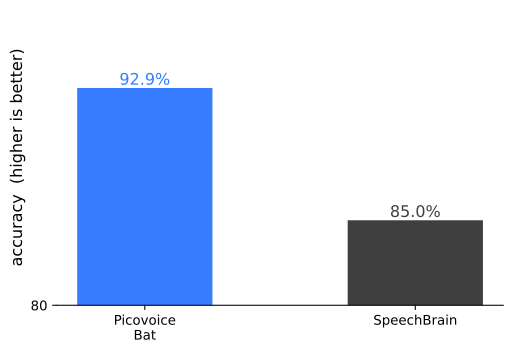
As a concrete reference point, Picovoice's Open-source Spoken Language Identification benchmark measures Bat against SpeechBrain LID on VoxLingua107 under open-set evaluation. Bat reaches 92.9 percent accuracy versus SpeechBrain's 85.0 percent, which is roughly 2x fewer errors (a 7.1 percent versus 15 percent miss rate), while using 5.4 MB of peak memory versus 333.4 MB (62x less) and a 0.44 core-hour ratio versus 3.90 (9x less compute).
Spoken Language Identification Datasets
VoxLingua107 is the reference dataset for Spoken Language Identification, with audio spanning 107 languages collected from public video. Mozilla Common Voice and Multilingual LibriSpeech are common training sources. These corpora are skewed by language, gender, and age, so teams have to sample them nonuniformly to avoid a biased model. Our walkthrough on how to build a language detection model covers that data handling in detail.
What Makes Spoken Language Identification Hard?
Several conditions push accuracy down, and most of them are specific to audio.
Short utterances: a one-word answer carries far less acoustic evidence than a full sentence, so early streaming decisions are the least certain.
Accent and dialect variation: the same language sounds different across regions and non-native speakers. See languages, dialects, and accents in voice AI for why global models beat per-accent packages.
Code-switching: speakers mix languages inside one conversation, such as Hindi and English in India or Spanglish. No single language dominates the input, so models trained on monolingual data struggle to classify it confidently.
Similar languages: high lexical and acoustic similarity, for example French and Italian, makes confident separation harder.
Background noise and speaker bias: noisy channels degrade acoustic features, and models can latch onto speaker traits instead of the language itself if training data is not diverse.
Where Spoken Language Identification Fits in a Voice Pipeline
Spoken Language Identification runs early, before transcription. A typical multilingual pipeline captures audio, optionally gates it with voice activity detection so only speech is processed, identifies the language, then routes the stream to the matching downstream model.
The language label selects the right engine at each later stage. A French detection routes audio to a French streaming speech-to-text model; a Spanish detection routes to the Spanish model. From there, the transcript can feed translation, a streaming text-to-speech voice in the target language, or a speech-to-intent and on-device LLM layer for a multilingual voice agent. For an end-to-end example, see the speech-to-speech translation recipe.
On-device vs Cloud Spoken Language Identification
Where the model runs shapes latency, privacy, and cost. On-device identification processes audio locally, which removes network round-trips, keeps audio on the device, and works offline. Cloud identification sends every audio frame to a remote server.
The major cloud speech APIs offer language identification, but with constraints documented in their own product docs.
Amazon Transcribe supports streaming language identification but is cloud-only and requires a candidate language list set upfront.
Azure Speech at-start detection can take up to 5 seconds, and its continuous identification is cloud-only.
Google Cloud Speech-to-Text requires a primary language code, limits detection to a handful of candidate languages, and is restricted to specific regions and models.
Deepgram and Rev AI offer language identification for pre-recorded files, not live streams.
Running on-device voice AI has inherent advantages over cloud-dependent systems.
Lightweight on-device AI models eliminate network latency and minimize compute latency to overcome speech latency issues. Fast language detection gives the rest of the pipeline time to finish its work, so on-device Spoken Language Identification is the low-latency choice.
On-device Spoken Language Identification also settles compliance by architecture rather than policy. When audio never leaves the device, deployments in healthcare, law enforcement, and public safety can meet GDPR, HIPAA, CCPA, and CJIS requirements without a data processing agreement.
The table below compares Spoken Language Identification across on-device and cloud engines.
| Engine | On-Device | Streaming (Live) | Returns "Unknown" (Open-Set) | Key Constraint |
|---|---|---|---|---|
| Bat Spoken Language Identification | Yes | Yes | Yes | Pre-trained; no candidate language list to maintain |
| Amazon Transcribe | No (cloud) | Yes | No | Requires a candidate language list set upfront |
| Azure Speech | No (cloud) | Yes | No | At-start detection up to 5 seconds; continuous is cloud-only |
| Google Cloud Speech-to-Text | No (cloud) | Limited | No | Requires a primary language code; limited candidates, regions, and models |
| Deepgram | No (cloud) | No | No | Pre-recorded files only, not live streams |
| Rev AI | No (cloud) | No | No | Pre-recorded files only, not live streams |
| SpeechBrain LID (open source) | Yes | Yes | Yes | 62x more memory and 9x more CPU than Bat; no production SDK or support |
| Whisper (open source) | Yes | No | No | Detects from the first 30 seconds of a file; not streaming |
See the review of top 10 Spoken Language Identification tools in 2026.
Spoken Language Identification Use Cases
Speech-to-speech translation: enables communications in multicultural cities and events, such as borders, police stations, hospitals, and conferences.
Call routing: detect a caller's language and route to a native-speaking agent or a language-specific IVR flow.
Media archiving and search: label large audio archives by language to make them searchable and to build an audio search engine.
Content moderation: flag language changes in monitored channels where speakers switch languages to avoid detection.
Multilingual voice agents: adapt an assistant's language in real time so one deployment serves users across regions.
Check out the live demo below to see how Bat Spoken Language Identification works in web browsers.
How to Choose a Spoken Language Identification Engine
While choosing the right Spoken Language Identification solution, the decisions that matter most:
- Streaming or batch, and the latency budget your pipeline can absorb.
- On-device or cloud, driven by privacy, offline needs, and cost at scale.
- Open-set handling, so the engine returns "unknown" instead of a confident wrong answer.
- Supported languages, and whether they cover your users.
- Memory and CPU footprint, so language identification leaves headroom for ASR, NLU, and app logic.
- SDKs, platform coverage, and compliance backing for production.
Implementation Guide
Ready to add Spoken Language Identification to your application? Here's how to get started.
Step 1: Choose Your Language Identification Engine
Commercial options:
Bat Spoken Language Identification: on-device, real-time engine that identifies the spoken language in about 2 seconds and returns a language code with a confidence score per frame. Runs offline across platforms, and returns "unknown" for languages outside its set instead of forcing a match.
Amazon Transcribe Language Identification: cloud service that supports streaming language identification, but requires a candidate language list set upfront and processes every frame in the cloud.
Azure Speech Language Identification: cloud service offering at-start detection (up to 5 seconds) and continuous identification; continuous is cloud-only.
Google Cloud Speech-to-Text Language Identification: cloud service that requires a primary language code, selects from a handful of candidate languages, and is limited to specific regions and models.
Open source options:
SpeechBrain LID: actively maintained; can process live audio, but uses 62x more memory and 9x more CPU than Bat, with no production SDK or enterprise support.
Whisper: includes built-in language detection that can identify the spoken language in audio files by analyzing the first 30 seconds of audio.
VoxLingua107 baselines (ECAPA-TDNN): research reference models on the standard dataset; useful for experiments, not production deployment.
Recommendation: Bat Spoken Language Identification is the only viable choice for real-time, private pipelines. It reaches 92.9% accuracy on VoxLingua107 under open-set evaluation, 2x fewer errors than SpeechBrain LID, using 5.4 MB of peak memory. A cloud STT's built-in language detection can be the simpler fit if you already run that cloud's transcription and can send audio off-device.
Step 2: Get Your Model
Bat is pre-trained, so there is no model to train and no ML expertise required:
- Log in to Picovoice Console
- Copy your
AccessKey - Plan for open-set handling: audio outside the supported set returns "unknown," so your pipeline gets a reliable signal rather than a confident wrong answer
No data collection, no custom training, no candidate language list to maintain.
Step 3: Integrate into Your Application
Bat provides SDKs across platforms:
- Mobile: iOS, Android
- Web: JavaScript / Web
- Desktop: Windows, macOS, Linux
- Embedded: Raspberry Pi
- Languages: Python, C
Basic Python example:
Drop Bat at the start of your audio pipeline and use the returned language code to route the stream to the right speech-to-text model, translation engine, or voice handler.
Step 4: Test and Optimize
- Test with short utterances and in realistic noise conditions
- Test across supported languages, various speakers, and accents, plus code-switching
- Verify open-set behavior returns "unknown" for unsupported languages
- Tune the confidence threshold and minimum audio window for your latency and accuracy targets
- Monitor accuracy and miss rate in production
Learn More About Spoken Language Identification
- Bat Spoken Language Identification
- Open-source Spoken Language Identification Benchmark
- Language Detection and Identification: Methods and Challenges
- How to Build a Language Detection Model
- Spoken Language Identification Tools Compared
- Languages, Dialects, and Accents in Voice AI
- Spoken language identification in Python: Step-by-Step Tutorial
Frequently Asked Questions
Spoken Language Identification is the task of automatically detecting which language is being spoken in an audio stream or file, without first converting speech to text. It analyzes acoustic features such as phonemes, rhythm, and prosody, and returns a language code with a confidence score. It is the first stage in most multilingual voice pipelines.
Language detection is the umbrella term for identifying the language of any content, written or spoken. Spoken Language Identification is the audio-only branch: it works on acoustic features rather than text, so it can label a language before transcription. For the written-text case and a full overview, see the language detection guide.
Audio is converted into spectral features such as a mel-spectrogram, a neural network maps those features to a language, and the system returns a language code with a confidence score. Modern engines use x-vector TDNNs, convolutional networks over spectrograms, or transformer and Conformer encoders.
It depends on the model, the languages, and the test conditions. Under open-set evaluation on VoxLingua107, Picovoice Bat reaches 92.9 percent accuracy versus SpeechBrain LID's 85.0 percent. Accuracy figures are only comparable when the datasets and open-set versus closed-set conditions match.
Yes. On-device engines can identify the language from a short window of live audio without a network connection. Bat identifies the spoken language in about 2 seconds using 5.4 MB of peak memory, which leaves room for the rest of the pipeline on mobile and embedded hardware.
Open-set evaluation includes audio from languages the model was not trained on and requires it to return "unknown" rather than misclassifying the input. It reflects production conditions, where users will speak languages outside the supported set. Engines that always pick the closest candidate can silently route audio to the wrong handler.


