
TLDR: Build voice AI agents for patient triage, appointment scheduling, and medical billing using Python with on-device speech processing. This tutorial implements a HIPAA-compliant medical voice assistant with wake word detection, real-time speech-to-text optimized for clinical vocabulary, and voice synthesis.
Cloud-based voice AI creates deployment challenges for healthcare: 1-2 seconds of latency disrupts conversation flow, and transmitting patient voice data requires extensive HIPAA compliance infrastructure. The 2024 Perry Johnson & Associates breach exposed 4 million patient records despite compliance measures, demonstrating the risks of centralized cloud storage.
On-device speech processing provides a secure alternative. By handling audio entirely on the edge and transmitting only anonymized text for reasoning, this approach minimizes network latency while ensuring Protected Health Information (PHI) remains secured within the local infrastructure, mitigating cloud compliance risks.
This tutorial demonstrates this hybrid edge architecture by building a fully functional triage agent. Wake word detection, speech recognition, and voice synthesis run entirely on-device, while GPT-4 is used strictly for medical reasoning on sanitized text.
What You'll Build:
- Wake word activation ("Hey Doctor") for hands-free operation
- Real-time speech transcription optimized for medical vocabulary
- GPT-4 reasoning layer
- Natural voice synthesis for patient responses
- Complete Python implementation deployable on edge devices
What You'll Need:
- Python 3.9+
- Microphone and speakers
- Picovoice
AccessKeyfrom the Picovoice Console - OpenAI API key from the OpenAI Platform page
System Architecture
The medical triage agent operates on a strict privacy-first pipeline, ensuring patient audio never leaves the device.
- Wake Word Detection: The system remains in a passive listening state using Porcupine Wake Word, waiting for a specific medical phrase (e.g., "Hey Doctor") to trigger activation without sending audio to the cloud.
- Local Transcription: Once triggered, custom Cheetah Streaming Speech-to-Text transcribes the patient's speech in real-time. This engine is optimized with a custom vocabulary to accurately capture clinical terminology, achieving higher accuracy than generic models.
- Sanitization & Reasoning: A local function strips Personally Identifiable Information or PII (names, dates) from the transcript before sending only the anonymized text to the OpenAI API for medical assessment.
- Voice Response: The text-based triage advice is converted back into natural speech using Orca Streaming Text-to-Speech and played to the patient.
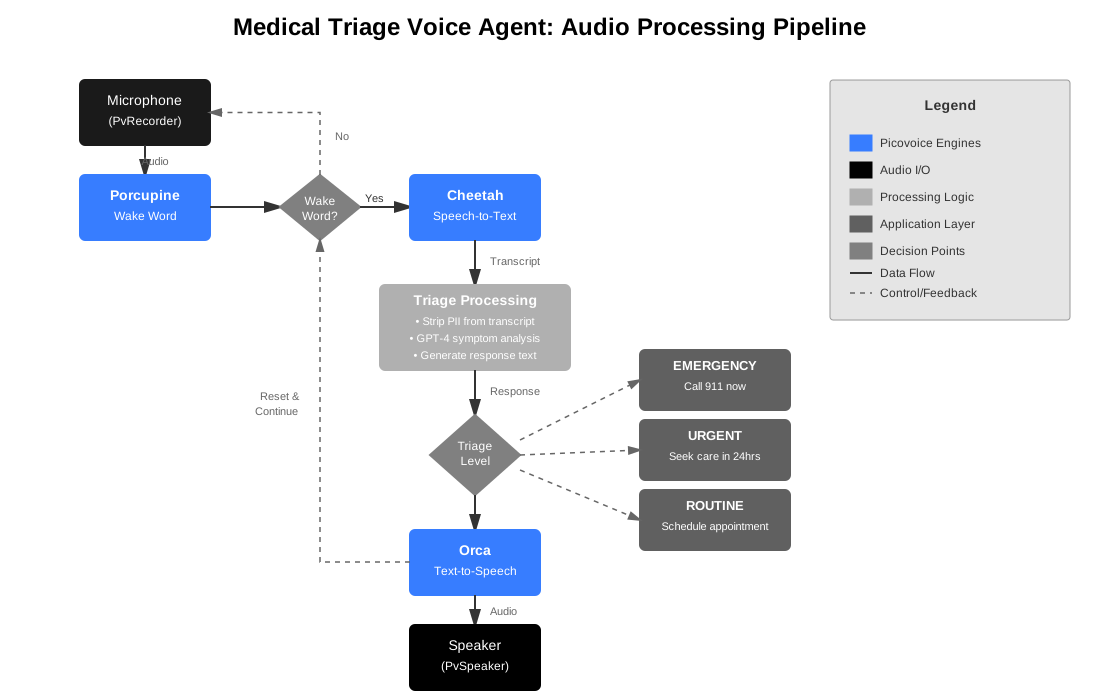
For deployments requiring zero cloud transmission of patient data, replace OpenAI with picoLLM to run the reasoning layer entirely on-device.
Create Custom Wake Word for Medical Assistant
- Sign up for a Picovoice Console account and navigate to the Porcupine page.
- Enter your wake phrase such as "Hey Doctor" and test it using the microphone button.
- Click "Train", select the target platform, and download the
.ppnmodel file.
For tips on designing an effective wake word, review the choosing a wake word guide.
Optimizing Speech Recognition for Clinical Vocabulary
- Sign up for a Picovoice Console account and navigate to the Leopard & Cheetah page.
- Click "New Model", give the model a name, choose the target language, and click "Create Model".
- Import the medical-dictionary.yml to add custom vocabulary to the model.
medical-dictionary.yml is a curated medical vocabulary for the real-time transcription model, built with the help of the Common Medical Words dataset. Learn how to generate your own in the Custom Speech-to-Text Model guide.
- Test the model using the microphone button.
- Download the model.
To further improve accuracy for speech-to-text, you can add boost words to your .yml file. Boost words increase the likelihood of correctly detecting important medical phrases, improving transcription accuracy for frequently used clinical terminology.
Install Python Dependencies
Install all required Python SDKs and dependencies with a single terminal command:
- Porcupine Wake Word Python SDK:
pvporcupine - Cheetah Streaming Speech-to-Text Python SDK:
pvcheetah - Orca Text-to-Speech Python SDK:
pvorca - Picovoice Python Recorder library:
pvrecorder - Picovoice Python Speaker library:
pvspeaker - OpenAI Python library:
openai— used for ChatGPT's OpenAI API integration.
Implement Wake Word Detection
Implement wake word detection to activate the agent hands-free:
Add Real-Time Medical Speech Recognition
Once the wake word has been detected, capture audio frames and transcribe them in real-time with Cheetah Streaming Speech-to-Text:
Implement AI-Powered Symptom Assessment
The triage engine takes the transcribed text output from Cheetah, sanitizes it to remove PII, and sends the anonymized query to the LLM for reasoning. The following code strips any personally identifiable information to protect patient privacy.
The modular architecture allows swapping GPT-4 for different reasoning models based on your deployment requirements.
Add Text-to-Speech Voice Responses
Convert triage assessments into natural speech:
Orca Streaming Text-to-Speech provides high-quality voice synthesis that runs entirely on-device, keeping patient interactions private.
Complete Medical Triage Voice Agent Code
Here's the full implementation combining all components:
Run the Medical Triage Agent
You will need the Picovoice AccessKey to use the SDKs. Copy it from the Picovoice Console.
Run the following command in your terminal. Replace the placeholder values with your own ACCESS_KEY, OPENAI_KEY and the file paths to your models.
The medical triage agent is now ready and listening for the wake word.
Example: Emergency Symptom Detection
Medical Voice AI for Appointment Scheduling, Billing, and Prescription Refills
The voice AI architecture demonstrated in this tutorial can be adapted for various medical applications beyond triage. Here are common implementations using the same core pipeline:
Appointment Scheduling Agent
Purpose: Automates patient appointment booking, rescheduling, and cancellations through natural conversation.
Implementation approach:
- Integrate with calendar/scheduling APIs (custom EHR systems)
- Add slot availability checking and confirmation workflows
Example interaction:
Billing Support Agent
Purpose: Handles insurance inquiries, payment processing, and billing questions.
Implementation approach:
- Integrate with billing systems and payment processors
- Implement secure payment collection workflows
Example interaction:
Prescription Refill Agent
Purpose: Automates prescription refill requests and pharmacy coordination.
Implementation approach:
- Integrate with pharmacy management systems
- Verify patient medication lists and refill eligibility through your EHR
Example interaction:
Medical Records Request Agent
Purpose: Processes requests for medical records, test results, and documentation.
Implementation approach:
- Integrate with EHR systems for record retrieval
- Provide secure delivery options (patient portal, fax, mail)
Example interaction:
Each of these implementations uses the same core voice pipeline with domain-specific system prompts, custom vocabulary for their domain, and integrations with relevant healthcare systems.
Next Steps: Customization and Integration
Multi-Language Support: Picovoice supports multiple languages for all models. Get language-specific Porcupine, Cheetah and Orca for different patient populations.
Interactive Follow-Up: Add follow-up questions based on initial symptoms. For instance, if a patient mentions pain, ask about severity on a 1-10 scale. If they mention fever, ask about temperature readings.
EHR Integration: Connect with electronic health records to access patient history and save triage assessments. In production deployments, the system would query your EHR's API for relevant medical history and write back triage results as encounter notes.
Phone System Integration: Integrate with existing phone infrastructure using Twilio or similar services. Incoming calls trigger the triage agent, and responses are delivered through the phone system's audio interface.
Multi-Agent Systems: Combine multiple agent types into a unified voice AI system. A patient could start with triage, get routed to appointment scheduling, and finish with billing questions—all in one continuous conversation.


