
When building conversational AI applications, TTS latency can make or break the user experience. A 3-second delay may feel like an eternity in real-time voice conversations as users expect instant responses just like talking to another person. While vendors focus marketing on TTS model speed, the reality is more complex: network delays, streaming architecture, and LLM integration all play critical roles in actual user experience. This article breaks down what truly affects TTS latency.
Key Takeaways
- Use real streaming TTS for LLM-powered applications to minimize time to first audio—users can hear responses in as little as 550ms vs. several seconds with legacy approaches
- Deploy on-device to eliminate network latency entirely and ensure consistent performance regardless of connectivity
- Choose optimized on-device engines—not all on-device solutions are equal; frameworks built for servers often struggle with runtime overhead on edge devices
- Scrutinize vendor benchmarks carefully—many measure only synthesis time, not real-world end-to-end latency
- Optimize for format over sample rate—compressed formats like MP3 can reduce cloud transfer time, while sample rate doesn't affect synthesis speed
Why TTS Latency Matters More Than Ever
As voice assistants and AI agents powered by LLMs become mainstream, TTS latency has become a key differentiator between a smooth, human-like experience and a clunky one. Users expect instantaneous spoken responses. Anything longer than a second or two feels slow. Yet TTS vendors describe latency in wildly different ways. Some quote only the model inference time. Some use “streaming” to mean completely different things. And network delays are often ignored altogether.
This guide explains:
- What “real-time” or “streaming” TTS really means
- Why some latency claims are misleading
- Streaming TTS types: Output Streaming and Dual Streaming
- Cloud vs. on-device latency breakdown
- Practical steps to minimize TTS latency
- How modern engines like Orca TTS cut latency down to the low hundreds of milliseconds
If you're searching for fast TTS, ultra-low-latency TTS, or solutions to TTS latency problems, this article is your definitive guide.
What Causes TTS Latency?
TTS latency is not caused by one thing. It is the sum of several sequential and sometimes overlapping delays. Some of the factors affecting the TTS latency are below:
- Network Latency (Cloud Only): The round-trip time for data to travel from the user's device to cloud servers and back. ISPs, firewalls, VPNs, API gateways, and geographic routing all affect network latency, which can range from 20ms under ideal conditions to several seconds on poor connections. Network latency affects the performance of cloud-based TTS. For on-device TTS, network latency is 0 ms.
- Audio Synthesis Time: Time to generate the full audio waveform. It’s also referred to as TTS Time-to-First-Byte (TTFB) or model latency. Neural network inference, PCM generation, audio encoding (MP3, Opus, WAV), and buffering for streaming affect the audio synthesis time.
- Client-Side Audio Playback Latency: Buffering strategy in the media player affects the latency of TTS systems. OS audio pipeline (Windows, iOS, Android, browsers differ) and device initialization affect the perceived latency significantly. For example, Bluetooth can add 150–250 ms latency to the system.
- Payload Size & Format: High-fidelity formats like WAV take longer to transmit compared to the compressed formats like MP3/Opus are faster, which becomes important for cloud TTS engines, while it’s negligible for on-device TTS engines.
- Overly Long Input Text: Legacy systems (Traditional and Output Streaming TTS engines) wait for the full input, even in real-time applications. Hence, longer text = longer latency. Dual Streaming TTS, like Orca, eliminates this constraint entirely by accepting text in real-time chunks as the LLM generates them.
- Poor Server Region Selection: Selecting distant cloud data centers can easily add 100–300 ms. If cloud providers do not allow region pinning based on individuals’ locations, there is nothing much developers can do about it.
- Cold Starts & Model Loading: Dynamic model loading on serverless platforms or on-device frameworks (PyTorch, ONNX) also affects the perceived latency. Cold starts can add a couple of seconds, depending on the tech stack.
- CPU/GPU Scheduling & Contention: Multi-tenant server scheduling, GPU queue delays, and OS-level CPU throttling affect the cloud TTS latency. For on-device, thermal throttling or power-saving modes can increase latency.
- Model Complexity: High-fidelity voices or expressive voice models generally have a larger model size, resulting in longer synthesis time or requiring more compute power.
- Middleware & Application Logic: API gateways, webhooks, logging, auth, and microservice hops affect cloud TTS latency, adding 10–50–100 ms per step in a cloud setup.
- Frontend–Backend Synchronization: Audio context startup, JavaScript lifecycle delays, WebSocket buffering, and encryption/decryption can add 50–150 ms to user-perceived latency.
- Device Hardware Variability: The hardware choices can affect the latency of on-device TTS, as the compute power of mobile vs. desktop vs. embedded CPUs is different. For large on-device TTS models, and repurposed server runtimes (PyTorch/ONNX runtime), overhead on mobile and embedded devices can be high. For cloud TTS, device hardware variability has no to negligible impact on latency.
- LLM Latency: LLM Latency refers to the time for the language model to generate full text. Token generation, batching, scheduling, and inter-service network hops affect the LLM latency. LLM Latency is high for legacy TTS systems (Traditional and output-only-streaming TTS). LLM Latency minimally affects the advanced (dual) streaming TTS engines, as dual streaming TTS engines start generating audio without waiting for LLMs to complete text generation.
- Security Layers: Enterprise security components, such as TLS handshake, proxy inspection, encryption/decryption overhead, can add 20–250 ms to the perceived latency.
Regardless of the causes, when humans feel a delay, it can ruin the whole experience, and humans are good at detecting them. In natural human conversation, turn-taking typically occurs with gaps of just 100-300ms, occasionally extending to 700ms. When TTS latency exceeds these thresholds, conversations feel artificial and frustrating. Keeping the latency minimal is crucial for the success of real-time applications.
Among all these factors, the choice between Output Streaming and Dual Streaming TTS has the most dramatic impact on user experience in LLM applications. Let's explore why.
Why is Streaming Text-to-Speech Important for LLM Applications?
This is the most important distinction for anyone seeking low-latency TTS for LLM applications.
For a comprehensive understanding of how TTS works and different synthesis approaches, see our Complete Guide to Text-to-Speech.
What's the Difference Between Output Streaming and Dual Streaming TTS?
Many providers—including Amazon Polly, Azure TTS, and OpenAI TTS use “streaming” TTS to mean:
- The full text is required before synthesis begins
- Audio (i.e., output) is streamed after synthesis starts
Output Streaming TTS Flow:
- LLM generates complete text
- TTS receives full text
- TTS begins synthesis
- Audio chunks are streamed
- Playback begins a few seconds later
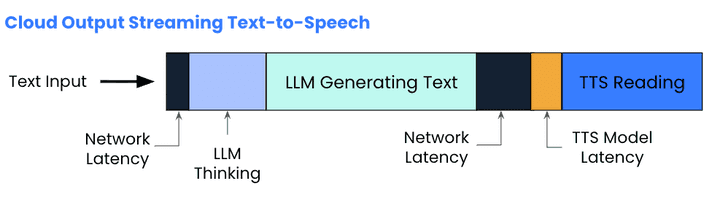
Real-world Example: Weather Query with Output Streaming TTS
User asks: "What's the weather forecast for this week?"
1. 0–3 seconds: LLM generates complete the complete response
2. 3.0–3.1 seconds: TTS receives full text, begins synthesis
3. 3.1+ seconds: User finally hears first audio
User Experience: 3+ seconds of awkward silence before hearing anything
Why it feels slow: Regardless of how fast the TTS model is, waiting for the entire LLM response before speaking a single word is similar to waiting for someone to finish composing their entire speech before opening their mouth. As humans, we speak as we think and decide what we’re going to say next. Output Streaming TTS was good for the traditional NLP era, but feels odd in the LLM era.
Dual Streaming TTS (True Real-Time TTS)
Dual streaming TTS accepts text incrementally, token by token or word by word, and begins speaking while the LLM is still generating its response. Orca Streaming Text-to-Speech implements input and output streaming and is also known as PADRI - Plan Ahead, Don’t Rush It.
Learn more about Orca's dual-streaming architecture and how it achieves industry-leading latency.
Dual Streaming TTS Flow
- LLM emits first tokens (usually 200-300 ms)
- TTS synthesizes immediately
- Audio begins nearly instantly
- LLM continues generating
- TTS continues synthesizing
- Audio flows seamlessly
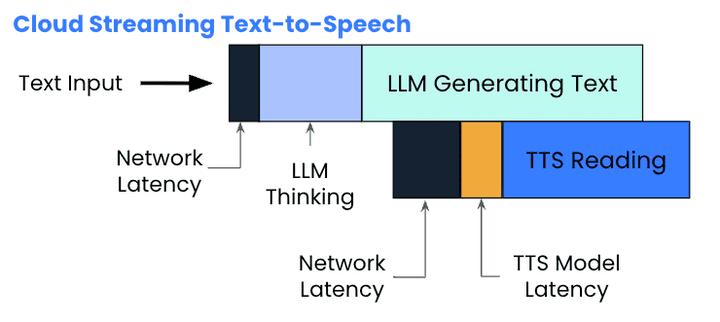
Real-world Example: Weather Query with Dual Streaming TTS
After an LLM receives the user inquiry, “What's the weather forecast for this week?", it takes 200-400 ms for the LLM to generate the first tokens: "The weather..." TTS speaks these words immediately in 100-200 ms, while LLM composes the rest. LLM and TTS continue to generate the response as the end users listen
Dual streaming is the only approach suitable for real-time voice agents, voice chatbots, AI companions, and robotics.
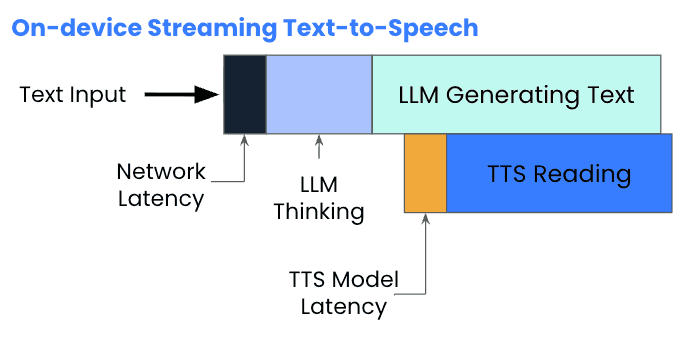
On-device Streaming Text-to-Speech reduces the latency even further by eliminating the network latency.
When the time is taken from the moment the LLM produces the first text token to the TTS engine produces the first byte of speech, i.e., First Token to Speech (FTTS), is measured, the open-source benchmark shows that Orca starts reading 6.5x faster than the closest competitor, ElevenLabs, thanks to its on-device processing capabilities.
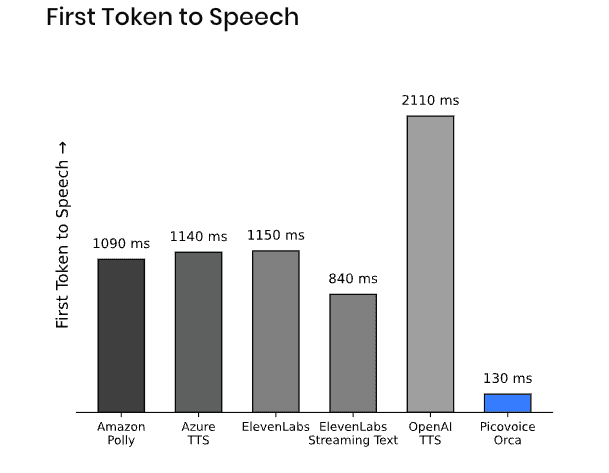
See the Open-source TTS Latency Benchmark for a detailed comparison among popular vendors, or reproduce the results for each vendor:
How Much Latency Does Cloud TTS Add?
Cloud TTS providers often promote impressive latency numbers, but these figures rarely tell the complete story. For example, ElevenLabs promotes 75ms latency for their Flash model, but this does NOT reflect real user experience. The asterisk reveals an important caveat: 'plus application and network latency. In another article, they cite 135ms for end-to-end time to first byte audio latency, though this still doesn't account for variable network conditions. Latency depends heavily on where synthesis happens, whether in the cloud or on the user’s device.
Real-World Cloud Latency Example:
A product team testing ElevenLabs TTS from their office in San Francisco might experience:
- Advertised latency: 75ms
- Documented TTFB: 135ms (to SF data center)
- Actual user experience in Tokyo: 400–600ms (network + model + audio transfer)
- User on slow mobile connection:800ms–2 seconds
The gap between "75ms" in marketing and "2 seconds" in reality is why enterprises are skeptical about the numbers they see on vendors' websites.
What Cloud TTS Vendors Don’t Emphasize:
- Network latency is unpredictable
- VPNs, proxies, Wi-Fi hops, and cellular networks worsen latency
- Even within a provider’s region, API throttling can increase response times
- Benchmarks may be from within the same datacenter, not real-world devices
On-device TTS eliminates network latency entirely. The request never leaves the device, removing this entire source of variability from the equation.
Not Every On-device TTS is Fast
But most on-device TTS systems repurpose voice models, and inference engines, such as PyTorch, ONNX built for servers and suffer from:
- Heavy inference runtimes
- High CPU/GPU overhead
- Mobile/embedded inefficiencies
Why Is Orca Text-to-Speech Faster Than Other On-Device TTS?
Orca Text-to-Speech is built by Picovoice from scratch and fully optimized end-to-end. It doesn’t use a repurposed server voice model or runtime. This enables:
- Dual streaming
- 130 ms FTTS (First Token to Speech)
- Guaranteed response time
- Real-time TTS on mobile, desktop, embedded devices, and browsers
How to Reduce TTS Latency
1. Limit Input Text Length for Legacy TTS
Consider breaking long responses into shorter segments or using summarization to reduce token count if you're not using dual streaming TTS. A 900-character request will be slower to process than a 300-character request with legacy TTS (traditional TTS and output streaming TTS.) Yet, don’t let this jeopardize the user experience. When someone asks for all 50 US states, telling them only 20 defeats the purpose. Input text length isn't a concern with dual streaming when text is provided in real-time as the LLM generates it.
2. Choose Audio Format Wisely for Cloud TTS
Use compressed formats like MP3 to reduce network transfer time for real-time applications using cloud TTS. High-quality formats like WAV require more bandwidth than compressed formats like MP3, increasing transfer time from server to device. On-device solutions like Orca can output WAV without this concern since there's no network transfer.
3. Use True Streaming TTS for real-time LLM applications
Traditional Text-to-Speech and Output Streaming Text-to-Speech wait until LLM generates the full response. With true streaming TTS, such as Orca Streaming Text-to-Speech, audio starts right after text begins, minimizing latency significantly.
4. Avoid Repurposed Models and Runtime for Real-Time TTS on Device
Models and runtime built and optimized for servers have performance limitations when it comes to on-device processing on embedded, mobile or browser environments. They introduce heavy compute overhead.
5. Consider LLM Latency
Consider using smaller, faster models when possible. Using cloud LLM APIs alongside cloud TTS introduces multiple network hops. For example, if you're using OpenAI's GPT for language generation and ElevenLabs for TTS, data travels to OpenAI's servers first, then to ElevenLabs servers—adding latency at each step. Self-hosted or on-device LLM solutions (such as picoLLM On-device LLM Platform) can dramatically reduce this component of latency while maintaining response quality.
Tutorials below demonstrate how streaming TTS eliminates awkward pauses and creates natural conversation flow when used with on-device LLMs:
- Fully on-device Android voice assistant
- Fully on-device iOS voice assistant
- Fully on-device web-based voice assistant
- Fully on-device Python voice assistant
Conclusion
When evaluating TTS latency, look beyond the headline numbers. Ask:
- Is this measuring only synthesis time, or true end-to-end latency?
- Does it account for network conditions your users will experience?
- What type of streaming does the solution support?
- How does it integrate with your LLM architecture?
For applications where responsiveness is critical—customer service, voice assistants, real-time translation—the architectural choices around streaming and deployment (cloud vs. on-device) often matter more than marginal differences in raw synthesis speed. Understanding these trade-offs is essential for building voice AI experiences that feel natural and responsive to your users.


