
Speech-to-Text Latency: How to Measure and Minimize
Speech-to-text (STT) latency is the time delay between spoken words and their transcribed text appearing, with real-time conversational AI systems targeting 500–800 ms end-to-end latency for natural interaction. Key factors include network transmission for cloud systems (typically starting around 50 ms depending on server distance), audio buffering (~250 ms), model processing (100–300 ms), and endpoint detection (200–500 ms). On-device speech recognition eliminates network delays entirely, allowing lightweight engines to achieve sub-500 ms total latency, while cloud-based systems typically experience 500–1200 ms in real-world deployments despite vendor claims of sub-300 ms.
Key Aspects of Speech-to-Text Latency
Definition: The delay from when a user speaks to when transcribed text appears in the application, measured as end-to-end latency across the complete recognition pipeline.
Optimal Performance: For conversational AI and live captioning, total end-to-end latency should remain around 500–800 milliseconds to feel responsive and match natural human conversation timing.
Factors Affecting STT Latency:
- Processing Method: Streaming speech-to-text (word-by-word transcription) achieves lower latency than batch processing (waiting for complete audio)
- Model Complexity: Deep learning models provide higher accuracy but require more computation. Larger models require more computation and, therefore, longer processing time on equivalent hardware
- Network Latency: Cloud APIs experience variable delays from internet connectivity, creating 50–300 ms bottlenecks under good conditions, 500–2000 ms under poor conditions
- Component Breakdown: Network transmission (50–300 ms), audio buffering (~250 ms), model processing (100–300 ms), endpoint detection (200–500 ms)
How to Reduce Latency:
- Deploy On-Device: Process audio locally on the device to eliminate network delay entirely (100–400 ms reduction)
- Use Streaming STT: Process audio in smaller, frequent chunks rather than waiting for complete audio files or utterances
- Use Optimized Models: Deploy purpose-built, lightweight models designed for real-time processing and for edge devices
- Enable Partial Results: Display interim transcripts continuously as text is processed
Why Word Emission Latency Matters Most in Measuring Speech-to-Text Latency
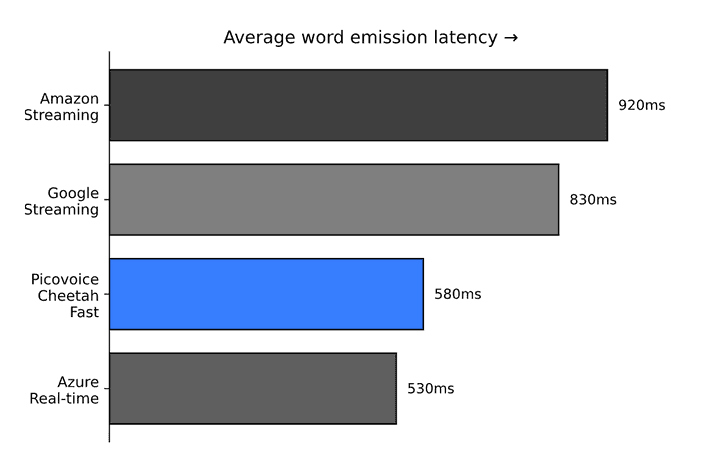
Word emission latency measures the delay between when a word is fully spoken and when its transcription appears in the application. It's the most accurate metric for user-perceived performance because it captures the entire recognition pipeline from speech completion to complete text output.
Picovoice's Open-source Real-time Transcription Benchmark measures Word Emission Latency along with Word Error Rate and Punctuation Error Rate.
Speech-to-Text Latency Ranges
Humans speak at approximately 120–150 words per minute, taking 400–500 ms to pronounce each word. Since ~500 ms is the time required to pronounce a word, it provides a useful baseline for understanding speech-to-text latency.
~500 ms: Ultra-low latency that feels instantaneous. It can typically only be achieved by lightweight on-device streaming engines or by fast cloud STT under ideal network conditions (high-speed internet and proximity to the data center).
500 ms means that the STT is one word behind the user. In other words, when the user finishes pronouncing the next word, STT completes typing the previous word and starts processing the uttered word.
500–1500 ms: Natural conversational flow still matching human turn-taking patterns. It's achievable with on-device processing or optimized cloud streaming speech-to-text under good network conditions. 1000 ms latency means that STT is two words behind the user.
Over 1500 ms: Poor conversational experience with frustrating delays. Occurs with cloud speech-to-text on poor network connections, batch processing systems, or improperly configured streaming implementations.
Sub-300 ms Speech-to-Text Latency Myth
Speech-to-text vendors describe latency in wildly different ways. Some quote only the model inference time. Others measure latency from within their own data centers, which doesn't reflect real-world network conditions. Examples of commonly used latency terminology include:
- TTFB (Time To First Byte - time from speech start to the first partial transcript arriving) ≤ 300 ms
- Sub-300 ms end-of-turn latency
- 300 ms latency at P50 (P50 latency, or median latency, is the point where 50% of requests are faster and 50% are slower.)
None of these definitions is technically wrong. They are measuring different things. A vendor quoting "300 ms end-of-turn latency" may be measuring only the time between the last spoken word and the server's response, entirely excluding the network round-trips that bookend that measurement in any real deployment. When evaluating STT solutions, enterprises should ask specifically: Does this latency represent what my users will experience? If a vendor can't answer that clearly, the number isn't actionable.
Since turn-taking in human conversations typically occurs with gaps of just 100-300 ms, occasionally extending to 700 ms, 300 ms became a magical number for latency, creating misleading performance claims and confusion among enterprise decision-makers evaluating speech recognition solutions. Hence, it's important to understand latency components.
Quick Reference: Latency Impact by Component
High Impact (100 ms+):
- Network Latency (cloud only): 20–3000 ms+
- Endpointing Latency: 300–2000 ms
- Audio Buffering: 100–500 ms
Medium Impact (50–100 ms):
- Model Processing Time: 50–300 ms
- Audio Capture & Encoding: 20–100 ms
- Cold Starts (first request): 200–2000 ms
Low Impact (<50 ms):
- Audio Format Conversion: 5–20 ms
- API Gateway Overhead: 10–30 ms
- Result Post-Processing: 5–15 ms
Detailed STT Latency Breakdown
- Model Processing Time: The actual time for the STT model to process audio and generate transcription. Processing time depends on model complexity, audio duration, hardware capabilities, and whether other requests are queued. Real-Time Factor (RTF), one of the metrics used to measure model processing time, shows how fast the system processes audio compared to real-time:
- RTF < 1: Faster than real-time (ideal for streaming)
- RTF = 1: Processes at exactly real-time speed
- RTF > 1: Cannot keep up with real-time audio
Example: RTF of 0.1 means processing 1 hour of audio takes 6 minutes.
Enterprises typically cannot measure the exact RTF for cloud STT APIs unless the models are deployed on-premises, as the amount of time spent to transcribe an audio file varies due to network latency.
RTF is the most important metric for on-device STT. Many "on-device" solutions repurpose server models and runtimes, resulting in:
- Heavy inference frameworks (PyTorch, ONNX)
- High CPU/GPU overhead
- Mobile/embedded inefficiencies
- Inconsistent performance across devices
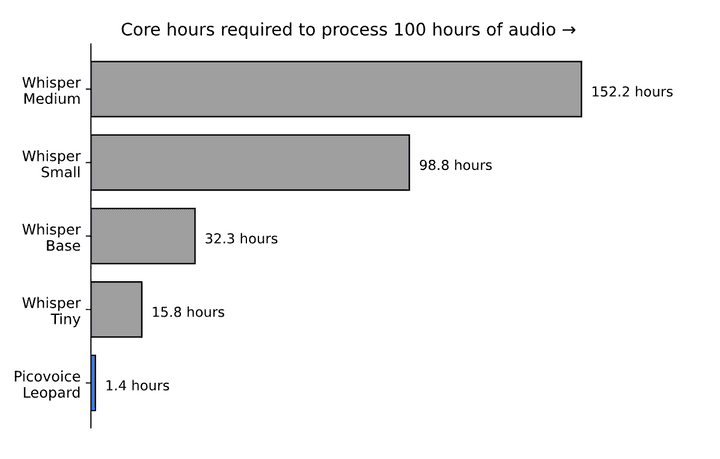
Picovoice's Open-source Speech-to-Text Benchmark shows Picovoice's Leopard Speech-to-Text is ~11x faster than Whisper Tiny and ~23x faster than Whisper Base, while matching or outperforming their accuracy.
- Network Latency (Cloud Only): The round-trip time for audio data to travel from the user's device to cloud servers and transcription results to return. Geographic distance, ISP routing, VPNs, firewalls, and network congestion all impact the network latency. Network latency ranges from 20 ms under ideal conditions to several seconds on poor mobile connections.
Critical Insight: Network latency is highly variable and unpredictable. Benchmarks from within the same data center don't reflect real user experience. A product team from San Francisco testing Cloud STT running in US-West servers might experience:
- Advertised latency: 300 ms
- Vendor's developer: 700 ms
- User in Tokyo: 1000 ms
- User on mobile connection: 1600 ms
The gap between "300 ms" in marketing and "1000 ms+" in reality is the main reason why successful demos do not necessarily turn into successful products.
- Endpointing Latency: Endpointing determines when the user has finished speaking. The system must wait through silence to confirm speech completion, adding 300–2000 ms depending on configuration.
Picovoice Cheetah Streaming Speech-to-Text gives developers better control over latency by allowing them to adjust endpointing duration.
The Endpointing Tradeoff:
- Short timeout: Fast response, but may cut off end users mid-sentence, especially if you're serving end users who naturally speak slowly or with pauses
- Long timeout: Accommodates natural pauses but adds perceived delay
Critical Insight: Cloud vs On-Device Endpointing:
For cloud STT, endpointing runs server-side, compounding with network delays:
- User stops speaking
- Audio continues streaming to the server (network delay)
- Server waits for endpointing timeout
- Results transmitted back (network delay)
Audio Buffering & Chunking: Streaming STT systems process audio in chunks. Google recommends chunks in 100-millisecond (ms) frame size as a good trade-off between minimizing latency and maintaining efficiency. Vendors require multiple frames before VAD activates or decoding begins. Smaller chunks reduce latency but may decrease accuracy. Larger chunks improve accuracy but increase delay. Batch processing systems wait for complete utterances (500–5000 ms+), increasing the delay.
Audio Capture Latency: Audio Capture Latency refers to the time from sound waves hitting the microphone to digital audio being available for processing. Hardware buffering, OS audio pipeline delays, and device drivers all contribute. Mobile devices typically add 20–50 ms, while web browsers can add 50–100 ms due to additional abstraction layers.
Audio Encoding & Format Conversion: It refers to converting raw PCM audio to compressed formats like MP3 for transmission. More aggressive compression reduces bandwidth but increases encoding time. Linear PCM requires no encoding but consumes more bandwidth, which can increase network transfer time.
Post-Processing & Formatting: Capitalizing sentences, adding punctuation, or formatting numbers are covered here. This usually has minimal impact, but can increase with complex post-processing rules.
Result Transmission (Cloud Only): Sending transcription results back to the client device. Text payloads are small, so this typically adds minimal latency compared to the initial audio upload.
Cold Start Overhead: First request after an idle period may require model loading, resource allocation, or container initialization. More common in serverless cloud deployments. On-device solutions can eliminate cold starts by keeping models in memory.
On-Device vs Cloud Speech-to-Text Latency
Where STT processing happens fundamentally determines latency characteristics, reliability, and user experience.
Latency Profile of On-Device Speech-to-Text
- Consistent and predictable
- Zero network dependency
- Performance depends on device capabilities
- No variance from connectivity issues
Latency Profile of Cloud Speech-to-Text
- Variable and unpredictable
- Dependent on network quality
- Geographic location matters significantly
- Shared infrastructure creates inconsistency
Cloud STT APIs can be a fit for pre-recorded audio processing where latency is not critical. However, the compounding network effect makes cloud-dependent solutions an unfavorable choice for Conversational AI applications, such as voice AI agents, as each round-trip adds latency.
For example, voice assistants using cloud STT + cloud LLM + cloud TTS may introduce 5–10 seconds of delay due to 6+ network round-trips per interaction, with each adding 50–500 ms depending on conditions.
Each round-trip adds latency:
- Audio upload (network delay)
- STT processing (advertised latency)
- Result download (network delay)
- LLM request (network delay)
- LLM processing
- Response download (network delay)
- TTS request (network delay)
- TTS processing
- Audio download (network delay)
How to Minimize Speech-to-Text Latency
1. Deploy On-Device When Latency Matters Most
On-device STTs eliminate network latency entirely by processing audio locally. Lightweight on-device STTs offer product teams full control over the UX with guaranteed response time and privacy.
See platform-specific implementations to add on-device STT to your app in minutes:
- .NET Streaming Speech-to-Text Tutorial
- Flutter Streaming Speech-to-Text Tutorial
- JavaScript Speech-to-Text Tutorial
- iOS Speech-to-Text Tutorial
- Android Speech-to-Text Tutorial
- React Native Speech-to-Text Tutorial
- Linux Speech-to-Text Tutorial
2. Optimize Audio Pipeline Configuration
Reduce Buffering: Using smaller audio chunks for streaming, minimizing buffer sizes in audio capture, and avoiding unnecessary intermediate buffering layers significantly help with perceived latency.
Check out Picovoice's open-source PvRecorder to process voice data efficiently.
Choose Appropriate Sample Rates: 16kHz is sufficient for speech recognition. Higher rates (44.1kHz, 48kHz) don't improve accuracy and increase bandwidth, which becomes a problem while using cloud STT. Lower rates (8kHz) may reduce accuracy.
Select Efficient Codecs: For cloud STT, consider compressed formats (Opus, MP3) to reduce transfer time and balance compression ratio vs encoding latency.
3. Minimize Network Hops for Cloud Deployments
Reduce network latency by minimizing network hops while using cloud STT APIs:
- Select regions closest to users
- Implement regional failover strategies
- Monitor network performance continuously
4. Avoid Repurposed Server Models for On-Device STT
Models built for servers introduce overhead on edge devices:
- Heavy runtime frameworks add latency
- Inconsistent performance across devices
- High memory and CPU requirements
- Thermal throttling on mobile devices
5. Monitor and Measure Real-World Latency
Instrument your application to track:
- Audio capture to the first transcription time
- Partial result update frequency (for streaming)
- Network latency percentiles
- Processing time variations
- Geographic performance differences
Learn more: How to Improve Speech-to-Text Accuracy
Open-Source STT Benchmarks
Picovoice provides transparent, reproducible benchmarks:
- Complete word emission latency measurement
- Real-world network conditions
- Public methodology and datasets
Compare STT solutions using Picovoice's Open-Source Real-Time Transcription Benchmark framework, using the default test data, your own data, or any open-source speech-to-text dataset.
- Reproduce Cheetah Streaming STT Latency
- Reproduce Azure Real-Time Speech-to-Text Latency
- Reproduce Amazon Transcribe Streaming Latency
- Reproduce Google Streaming Speech-to-Text Latency
Optimize the Complete Voice AI Stack to Reduce End-to-End Latency
For the lowest possible latency in conversational AI, optimize the entire pipeline with lightweight and accurate on-device voice AI solutions, such as Orca Streaming Text-to-Speech and picoLLM On-device LLM. By keeping all processing on-device, you eliminate 6+ network round-trips and achieve sub-second end-to-end latency for complete voice interactions.
Complete On-device Conversational AI Examples:
- Fully on-device Android voice assistant
- Fully on-device iOS voice assistant
- Fully on-device web-based voice assistant
- Fully on-device Python voice assistant
Additional Resources
- Real-time Transcription Complete Guide
- How to Choose the Best Speech-to-Text
- Speech-to-Text Features
- End-to-End vs Hybrid Speech-to-Text
- Whisper Alternative for Real-Time Transcription
- Training Custom Speech-to-Text Models
- Speech-to-Text Privacy & Security
- Open-Source Speech-to-Text Datasets
Key Takeaways
Vendor claims exclude critical delays: Some cloud speech-to-text vendors measure only processing time (100–300 ms), excluding network transmission (50–300 ms), buffering (~250 ms), and endpoint detection (200–500 ms)
Streaming beats batch for real-time: Streaming speech-to-text processes audio incrementally; batch processing waits for complete utterances. Whisper Speech-to-Text, for example, is designed to process audio in segments of 30 seconds.
On-device eliminates network variability: On-device processing delivers a predictable, guaranteed response time (i.e., latency) regardless of connectivity, while cloud systems range from 500 ms to 2000+ ms depending on network conditions
Measure end-to-end, not processing time: Total latency includes audio capture, network transmission, model inference, and result delivery, not just model processing speed
Conclusion
When evaluating speech-to-text latency, look beyond the headline numbers. Ask:
- Is this measuring only processing time, or true end-to-end latency?
- Does it account for network conditions your users will experience?
- How does it integrate with the rest of your stack?
For applications where responsiveness is critical—voice assistants, conversational AI, real-time captioning—architectural choices around streaming vs batch and cloud vs on-device often matter more than marginal differences in raw processing speed.
Key Decisions:
- Real-time applications: Use streaming STT, preferably on-device
- Non-real-time transcription: Batch processing and cloud are acceptable
- Latency-sensitive use cases: Deploy on-device to eliminate network variability
Understanding these trade-offs is essential for building voice AI experiences that feel natural and responsive to your users.
Ready to minimize STT latency in your application?
Start FreeFrequently Asked Questions
STT Latency is affected by several factors beyond the model speed, including microphone buffering, network delay, model inference time, and text finalization.


