
Understanding and Reducing Latency in Speech Recognition Applications
Latency in speech recognition refers to the delay between when a user speaks and when the system responds, whether through transcription, command execution, or voice output. For real-time voice applications like conversational AI agents and voicebots, latency directly determines whether interactions feel natural or frustratingly slow. Human conversation naturally flows with turn-taking gaps of 100–300ms, occasionally extending to 700ms. When speech recognition systems exceed these thresholds, conversations feel unnatural, and users disengage.
A voice application that is highly accurate but slow feels broken. Modern voice applications must balance accuracy, latency, cost, and efficiency to deliver natural user experiences.
This guide explains latency across the complete voice AI stack—from wake word detection through speech-to-text, intent recognition, and text-to-speech—with actionable strategies to minimize delays in production applications.
Why Latency Matters for Voice AI
Real-time translation, AI agents, and voice-controlled systems have elevated user expectations for instantaneous responses. When someone speaks to Alexa, Google Assistant, or a custom voice application, they expect recognition and response within the natural flow of conversation.
High latency eliminates the value of voice AI in most real-time applications. Consider this common frustration: asking Alexa to "set a 10-second timer" and waiting more than 10 seconds for the timer to start. When a voice interaction breaks conversational flow, users stop trusting the system. Live captions become impossible to follow, voice AI agents feel unresponsive, real-time coaching loses its usefulness, and in high-stakes environments like automotive or medical robotics, slow responses can actively disrupt workflows or create safety risks.
Latency in Voice AI Systems
Voice AI applications combine multiple components, each contributing to total system latency. Understanding where delays originate enables targeted optimization for specific use cases.
Wake Word Detection Latency
Wake word detection continuously monitors audio for activation phrases like "Hey Siri" or "Alexa." This component must operate with minimal latency because it gates all subsequent processing—users expect instant activation when they speak the wake word. Using ASR for wake word detection or running wake word detection in the cloud introduces unacceptable delays and defeats the purpose of a lightweight, always-on activation layer.
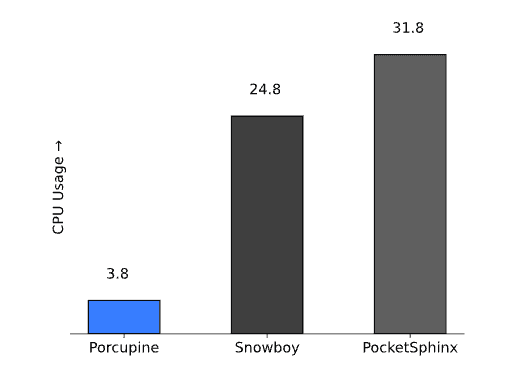
Porcupine Wake Word is a lightweight wake word detection engine that provides always-listening voice activation, enabling hands-free interaction without requiring button presses. Wake word engines that consume excessive CPU or memory prevent other voice AI components from functioning properly on resource-constrained devices.
Open-source Wake Word Benchmark shows that Snowboy uses 6.5x more resources than Porcupine; in other words, Porcupine is 6.5x faster than Snowboy using the same resources.
Speech-to-Text Latency
Speech-to-text latency measures the delay between spoken words and their transcribed text appearance. Two fundamental architectures create vastly different latency profiles:
Cloud-based speech-to-text systems require network transmission of audio data to remote servers, processing on shared infrastructure, and network transmission of transcription results back to client devices. Since audio is a large data type, its transmission takes longer than simple text. Total delay typically ranges from 500–1200ms in real-world deployments, with poor network conditions extending delays to 2000ms or more.
On-device speech-to-text engines process audio locally, eliminating network latency entirely. Lightweight engines optimized for edge deployment achieve sub-500ms latency with predictable performance regardless of connectivity.
Read the complete speech-to-text latency guide covering word emission latency measurement, vendor claim evaluation, and detailed optimization strategies.
Intent Detection Latency
Traditional voice command systems follow a two-stage pipeline: first converting speech to text, then extracting intent from transcribed text. This approach adds latency by requiring two large models—speech-to-text and natural language processing—which may even be hosted in different locations.
Speech-to-Intent solutions, like Rhino Speech-to-Intent, process voice commands directly without intermediate text generation, extracting meaning from audio in a single operation.
For domain-specific voice-controlled applications, common commands and inquiries, speech-to-intent architecture provides faster responses than traditional STT→NLU pipelines.
Voice Activity Detection Latency
Voice Activity Detection (VAD) is one of the smallest components in most voice AI systems, yet it's often overlooked. It determines when users start and stop speaking, enabling systems to capture complete utterances without cutting off mid-sentence or waiting unnecessarily after speech ends.
Audio capture → VAD → Speech-to-Text → VAD → NLP → Response
Despite being a small component, VAD creates delays that propagate through the entire system. — the pipeline waits on its decisions before proceeding. This affects both endpoint detection and continuous compute usage. Despite being small, since the pipeline waits for VAD decisions, delays introduced here propagate through the entire system, as it impacts the VAD performance can affect multiple factors, such as endpoint detection and continuous compute usage. Inefficient VAD can consumes CPU resources needed by the rest of the speech pipeline. When evaluating VAD, factor in its cumulative effect on the entire pipeline, not just its isolated performance. So, while evaluating VAD, its overall impact should be considered.
For example, the Open-source VAD Benchmark shows that Silero VAD measures a Real-time-Factor (RTF) of 0.0043, which means 0.43% real-time CPU usage vs Cobra VAD’s RTF of 0.0004, which means 0.039% real-time CPU usage. Despite the ~11x difference, 0.43% CPU usage can be considered negligible in isolation. Yet, this also means that if Cobra VAD takes 14 ms to complete a task (process an audio stream), the same task takes 154ms with Silero VAD.
Compare Voice Activity Detection engines for detailed performance analysis, including accuracy, resource efficiency, and platform support across WebRTC VAD, Silero VAD, and Cobra VAD.
Text-to-Speech Latency
After processing user input and generating responses, conversational AI applications must convert text back to spoken audio. Text-to-speech latency determines how quickly users hear responses.
Two architectural approaches create different user experiences for LLM-powered applications.
Mono-streaming text-to-speech waits for a complete text response before generating audio. This creates noticeable delays where users wait in silence after speaking, wondering if the system heard their request.
Streaming text-to-speech generates audio incrementally as response text arrives, enabling users to hear responses beginning almost immediately, even for longer outputs.
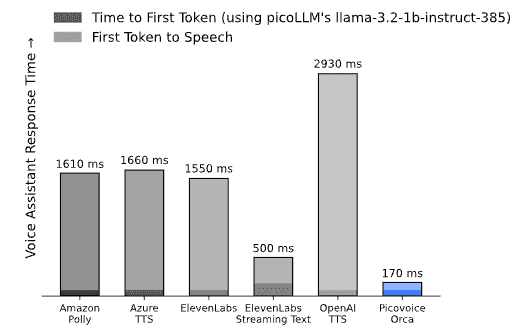
Where TTS is deployed—whether on-device or in the cloud—also significantly affects latency and user experience. Open-source TTS Latency Benchmark shows that building an LLM-powered voice assistant using Orca Streaming Text-to-Speech brings the response time down to 170ms after the LLM generates the response, reducing total response time by 3x compared to its closest competitor, ElevenLabs Streaming Text-to-Speech.
Read the complete text-to-speech latency guide covering streaming vs batch architecture, cloud vs on-device performance, and optimization strategies.
Speaker Recognition Latency
Speaker recognition identifies who is speaking, enabling multi-user applications to personalize responses and maintain separate user profiles. This component becomes particularly important for shared devices like smart home assistants and automotive voice control systems.
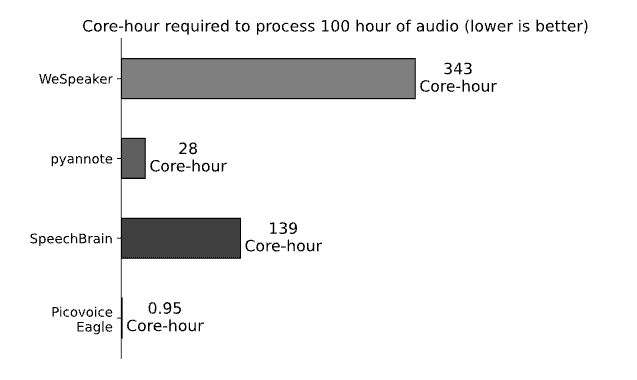
Open-source Speaker Recognition Benchmark shows that pyannote requires ~30x more resources than Picovoice Eagle Speaker Recognition. In other words, using the same resources, pyannote takes ~30x more time to process the same data.
Root Causes of Latency in Voice AI
Speech recognition latency originates from three major sources: network transmission delays, model processing time, and architectural choices around how audio is handled.
- Network latency is the largest and most variable factor in cloud systems — geographic distance alone adds unavoidable delay, and conditions like mobile connectivity, VPNs, and congestion compound it further.
- Model processing time depends on architecture and hardware, quantified as Real-Time Factor (RTF): an RTF below 1.0 means the system processes audio faster than real-time, which is the minimum bar for live applications.
- Architecture determines whether the system waits for complete utterances before processing or handles audio incrementally. For example, OpenAI Whisper Speech-to-Text is unsuitable for real-time applications despite being state-of-the-art for batch transcription since Whisper is designed to processes audio in 30-second chunks.
In isolation, each source is manageable. The problem is they don't operate in isolation — they compound across every step of the voice AI pipeline. Traditional cloud-dependent voice assistants require multiple sequential network operations:
- Wake word detection (on-device): Activates system when user says trigger phrase (compute latency)
- Audio upload (cloud): Streams captured audio to cloud servers (network latency)
- Speech-to-text processing (cloud or on-device): Converts speech to text (compute latency)
- Transcript download (cloud): Returns text to client device (network latency)
- Large Language Model request (cloud): Uploads transcript for response generation (network latency)
- LLM processing (cloud or on-device): Generates response text (compute latency)
- Response download (cloud): Returns generated text (network latency)
- Text-to-speech request (cloud): Uploads response for audio generation (network latency)
- TTS processing (cloud or on-device): Converts text to speech (compute latency)
- Audio download (cloud): Streams synthesized speech to device (network latency)
Total delay: 6 trips to and from the cloud, assuming each network hop averages 150 ms, add approximately 900 ms in network latency alone, before accounting for anything else, including the processing time. This explains why seemingly fast cloud APIs create frustrating user experiences. Even if each processing step completes quickly, network transmission time can dominate total latency.
The Architectural Decision That Matters Most to Minimize Latency in Voice AI
Deployment decision affect all components in the pipeline. Moving to lightweight on-device voice AI eliminates network transmission entirely as it requires no audio upload, no result download, no round-trips. What remains is pure compute latency, which is predictable, consistent, and minimal with lightweight models and inference engines. Cloud-dependent architectures, regardless of how fast individual components are, introduce network variability that compounds across every stage of the pipeline and cannot be fully engineered away.
- Move Compute Closer to the User: The distance the signal must travel is the primary reason for latency. Moving voice data near the compute or compute near the data reduces the signal travel distance. Choose on-device processing (edge AI) when possible; if not, make sure datacenters are close to end users.
- Reduce Model Size and Runtime Cost: Efficient models designed for real-time inference reduce compute latency and hardware requirements. Choosing resource-efficient software is as important as selecting powerful hardware.
- Eliminate Network Round-Trips: Sending audio to remote servers introduces transmission delay, congestion variability, and regional infrastructure differences. On-device processing removes these variables and provides consistent, predictable response times.
How to Build Low-Latency Voice Applications
Reducing latency requires the right combination of architecture, models, and deployment strategy. Picovoice provides lightweight, modular, and on-device voice AI engines designed for real-time performance:
- Porcupine Wake Word Docs
- Rhino Speech-to-Intent Docs
- Cheetah Streaming Speech-to-Text Docs
- Orca Streaming Text-to-Speech Docs
- Eagle Speaker Recognition Docs
- picoLLM On-device LLM Platform Docs
Running locally on the device eliminates network delays and delivers predictable, reliable response times across platforms.
Start BuildingAdditional Resources
- Text-to-Speech Latency Guide
- Complete Guide to Text-to-Speech
- Speech-to-Text Latency Guide
- Complete Guide to Real-time Transcription
- End-to-End vs Hybrid Speech Recognition
- Complete Guide to Wake Word Detection
- Wake Word Benchmarks
- Benchmarking a Wake Word
- Complete Guide to Voice Activity Detection
- Python Voice Assistant powered by on-device LLM
- Android Voice Assistant powered by on-device LLM
- iOS Voice Assistant powered by on-device LLM
- Web Voice Assistant powered by on-device LLM


