
Real-time transcription converts speech to text instantly with <1 second latency as someone speaks. Also called streaming speech-to-text or live transcription, it processes audio continuously rather than waiting for complete files, enabling live captions, meeting transcription, voice assistants, and accessibility features across industries.
This guide covers how real-time transcription works, metrics used to measure performance (accuracy, latency), on-device vs cloud deployment options, the most popular open-source and commercial solutions, and production implementation best practices.
Table of Contents
- What is Real-Time Transcription?
- How Streaming Speech-to-Text Works
- Streaming Speech-to-Text vs Other Technologies
- Measuring Real-Time Transcription Performance
- Choosing a Real-Time Transcription Solution
- Implementation Guide
- Platform-Specific Tutorials
- Real-time Transcription Use Cases and Applications
- Best Practices
- Advanced Topics
- Getting Started with Cheetah Streaming Speech-to-Text:
- Conclusion
- Frequently Asked Questions
What is Real-Time Transcription?
Real-time transcription (streaming speech-to-text) converts spoken language into written text as it's being spoken, with minimal delay between speech and text output. Unlike batch transcription, which processes complete audio files, real-time transcription processes audio streams continuously and delivers transcripts incrementally.
Key characteristics of real-time transcription:
- Streaming input: Processes continuous audio, not complete files
- Incremental output: Returns partial transcripts as speech progresses
- Low latency: ~1s delay between speech and text
- Live processing: Handles ongoing conversations
How Streaming Speech-to-Text Works
Real-time speech-to-text systems process audio incrementally through a continuous pipeline, converting speech to text with minimal buffering and delay.
The Real-Time Transcription Pipeline
- Audio Capture - Microphone continuously captures audio (typically 16kHz)
- Preprocessing - Audio is normalized and optionally filtered for noise or silence
- Audio Buffering - Small chunks buffered (50-200ms chunk size)
- Feature Extraction - Audio converted to acoustic features
- Acoustic Modeling - Neural networks convert audio features into phonetic representations.
- Language Model Application - Linguistic context improves accuracy
- Transcript Output - Incremental results delivered in real-time
Streaming Speech-to-Text vs Other Technologies
Understanding the differences between Streaming Speech-to-Text and related technologies helps with choosing the right solution.
Real-Time vs Batch Transcription
Batch or Async Transcription processes complete audio files after recording. It has access to the entire audio context before generating transcripts.
Batch transcription can use multiple passes for optimal accuracy and operates under no latency constraints, as the transcription happens after the fact.
Advantages of Batch Transcription:
- More sophisticated post-processing possible
- Lower computational cost per hour of audio
Batch Transcription Use Cases:
- Post-production transcription
- Legal documentation
- Academic research
- Content creation and editing
- Archive digitization
While Cheetah Streaming Speech-to-Text processes streaming input in real time, Leopard Speech-to-Text can only process complete audio.
Key Differences: Real-Time vs Batch Transcription
Input Format:
- Real-Time Transcription: Continuous audio streams
- Batch Transcription: Complete audio files
Output Delivery:
- Real-Time Transcription: Incremental partial transcripts as speech progresses
- Batch Transcription: Full transcript after processing completes
Context Availability:
- Real-Time Transcription: Limited to past audio only
- Batch Transcription: Full audio context available
Homophones (e.g., whether vs weather) pose a known challenge for speech-to-text systems. Batch transcription can benefit from knowing the context, yet streaming speech-to-text functions with limited information.
Real-Time Transcription vs Wake Word Detection
- Wake Word Detection - Listens to predetermined phrases to activate software (binary: yes/no)
- Speech-to-Text - Transcribes speech into text without focusing on any specific word or meaning
Why Real-Time Transcription is not fit for Wake Word Detection
Some developers use Real-Time Transcription to detect wake words. This approach has several significant drawbacks:
- Resource Intensive - Real-Time Transcription requires significantly more CPU/memory than wake word detection
- Higher Latency - Real-Time Transcription introduces delays unacceptable for always-listening scenarios
- Privacy Concerns - Real-Time Transcription records and transcribes everything to "find" the wake word
- Power Consumption - Real-Time Transcription drains battery quickly on mobile/IoT devices
Read more about why ASR shouldn't be used for wake word recognition.
Real-Time Transcription vs Speech-to-Intent
Both Real-Time Transcription and Speech-to-Intent can be used for Spoken Language Understanding.
- Speech-to-Intent works within a given context (domain). Every expression must be defined to trigger an action. If a model is not trained to capture "lights on" intent, or hears a brand-new expression, it cannot trigger an action.
- Speech-to-Text can be used with Natural Language Understanding (NLU), or as has recently become popular with Large Language Models (LLMs), to initiate an action. Since LLMs are smarter versions of NLU, they offer more flexibility to capture unseen expressions. Yet, intents and relevant slots must be defined in the function prior to triggering an action.
Why Real-Time Transcription Matters
Real-time transcription has become essential infrastructure for modern voice-enabled applications. Here's why it matters:
Accessibility: Real-time captions in live-streaming improve inclusivity for users who are deaf or hard of hearing and are increasingly required for compliance.
- Live captioning for meetings, events, and broadcasts
- Real-time subtitles for video calls
- Instant text alternatives for audio content
- Compliance with accessibility regulations (ADA, etc.)
Productivity: Meeting transcripts enable discoverability and searchability, instant notes, and real-time AI assistants.
- Automatic notes and action items
- Searchable records to find specific discussions instantly
- Real-time translation for global teams
- Participants can focus on conversation, not note-taking
Business Intelligence and Analytics: Real-time transcription enables immediate insights.
- Real-time agent coaching and guidance in customer service
- Live call analysis and next-best-action suggestions in sales meetings
- Instant detection of prohibited phrases or topics for compliance purposes
- Perform sentiment analysis to monitor speech emotions
Cost Efficiency: Real-time transcription reduces manual work:
- Eliminates the need for human transcriptionists in many scenarios or helps them be more efficient
- Reduces administrative work in cases such as medical dictation and legal discovery
- Enables automation of repetitive documentation tasks
- Scales effortlessly with demand
Speech-to-text is used across industries as it enables voice dictation, verbatim transcription, or as the first stage in live language translation pipelines, LLM-powered voice assistants, and more.
Measuring Real-Time Transcription Performance
Evaluating real-time transcription systems requires measuring multiple dimensions of performance.
1. Accuracy Metrics
1.1. Word Error Rate (WER)
Word Error Rate (WER) is the industry-standard accuracy metric, calculated as:
- Substitutions (S): Incorrect words (said "cat", transcribed "hat")
- Deletions (D): Missing words (said "the cat", transcribed "cat")
- Insertions (I): Extra words (said "cat", transcribed "the cat")
Lower WER = Better Transcription Accuracy
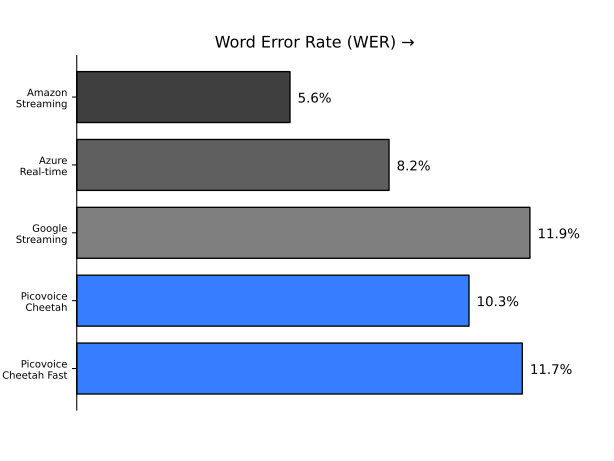
Although it's an industry standard, WER is also easy to manipulate. Vendors can share technically correct but misleading claims as
- Test conditions matter (noise, accent, domain-specific vocabulary)
- Real-world performance often differs from lab results
- Some errors matter more than others (content words vs function words)
Learn more about benchmarking speech-to-text systems, and things to know about WER.
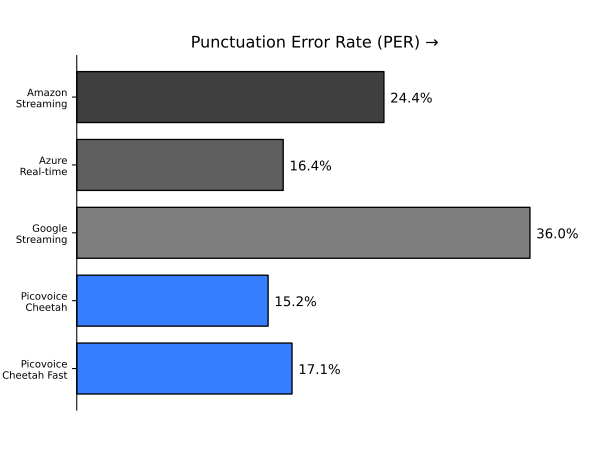
1.2 Punctuation Error Rate (PER)
Punctuation Error Rate is the ratio of punctuation-specific (comma, question mark, etc.) errors between a reference transcript and the output of a speech-to-text engine to the number of punctuation-related operations in the reference transcript.
Lower PER = Better Punctuation Accuracy
2. Latency Metrics
End-to-End Latency:
Time from when the speech is spoken to when the full transcript appears. Yet, it may be differently defined and measured by vendors.
Below are the major latency metrics that contribute to the end-to-end latency.
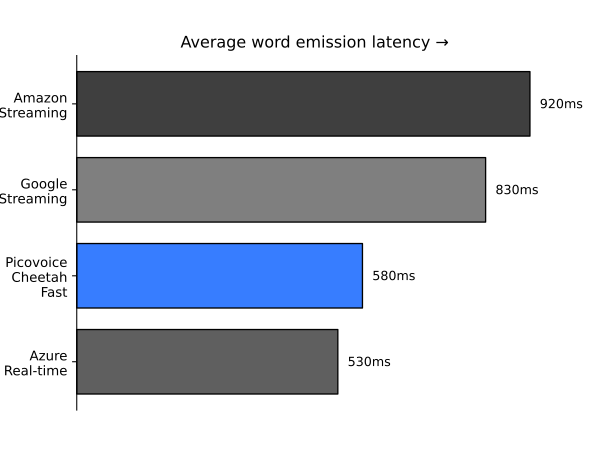
2.1. Word Emission Latency:
Word emission latency is the average delay from when a word is finished being spoken to when its transcription is emitted by a streaming speech-to-text engine. Lower word emission latency means a more responsive experience with smaller delays between intermediate transcriptions.
2.2. Network Latency (Cloud Only):
The round-trip time for audio data to travel from the user's device to cloud servers and transcription results to return. Geographic distance, ISP routing, VPNs, firewalls, and network congestion all impact the network latency. Network latency ranges from 20ms under ideal conditions to several seconds on poor mobile connections.
2.3 Endpointing Latency:
Endpointing determines when the user has finished speaking. The system must wait through silence to confirm speech completion, adding 300ms–2000ms depending on configuration.
Picovoice Cheetah Streaming Speech-to-Text gives developers better control over endpointing latency by allowing them to adjust endpointing duration.
Factors affecting latency:
High Impact (100ms+):
- Network Latency (cloud only): 20ms–3000ms+
- Endpointing Latency: 300ms–2000ms
- Audio Buffering: 100ms–500ms
Medium Impact (50–200ms):
- Model Processing Time: 50–300ms
- Audio Capture & Encoding: 20–100ms
- Cold Starts (first request): 200ms–2000ms
Low Impact (<50ms):
- Audio Format Conversion: 5–20ms
- API Gateway Overhead: 10–30ms
- Result Post-Processing: 5–15ms
Do you find production latency is much worse than advertised latency? We have some tips to evaluate speech-to-text latency better:
Real-Time Factor (RTF)
Real-Time Factor (RTF) measures how fast the system processes audio compared to real-time:
- RTF < 1: Faster than real-time (ideal for streaming)
- RTF = 1: Processes at exactly real-time speed
- RTF > 1: Cannot keep up with real-time audio
Example: RTF of 0.1 means processing 1 hour of audio takes 6 minutes.
3. Resource Efficiency
3.1 CPU Usage
Percentage of CPU consumed during transcription:
- <10%: Minimal impact, ideal for mobile
- 10-30%: Reasonable for desktop applications
- 30-50%: May impact other applications
- 50%: May cause thermal or battery issues
3.2 Memory Footprint
RAM required for the transcription engine:
- <50MB: Excellent for embedded devices
- 50-200MB: Good for mobile applications
- 200-500MB: Acceptable for desktop
- 500MB: May be challenging on constrained devices
3.3 Power Draw
Critical for mobile applications. Large on-device models due to compute and cloud-dependent models due to sending audio data to remote servers can drain the battery of mobile devices.
4. Reliability Metrics
- Uptime - System availability (for cloud solutions)
- Error rate - Frequency of system failures or crashes
- Recovery - How system handles network interruptions
- Consistency - Accuracy across different conditions
Choosing a Real-Time Transcription Solution
Selecting the right real-time transcription solution depends on your specific requirements. Here are key factors to consider:
1. Accuracy
- What WER is acceptable for your use case?
- Do you need specialized vocabulary (medical, legal, technical, brand names)?
- What accents and dialects must you support?
- How noisy are your audio conditions?
2. Latency
- How quickly must transcripts appear?
- Is <100ms latency critical, or 1 second acceptable?
- Can you buffer audio, or must processing be truly real-time?
3. Privacy and Security
- Can audio data leave the device?
- Do you need HIPAA, GDPR, or other compliance?
- Are you handling sensitive or confidential information?
Learn more about speech-to-text privacy and security.
4. Deployment Requirements
- On-device, on-prem, cloud, or hybrid?
- What platforms must you support?
- What are your bandwidth constraints?
Learn more about AI Deployment Options: On-device, on-prem or in the cloud.
5. Language Support
- What languages must you support?
- Are accents and dialects important?
- Explore speech-to-text language support
6. Integration Complexity
- SDK availability for your platform
- Quality of documentation and examples
- Community support and resources
- Time to production
Commercial Streaming Speech-to-Text
Cloud-Based Options
Google Cloud Speech-to-Text
- Pros: GCP ecosystem, multilingual and streaming support
- Cons: Low accuracy, cloud-dependency, network latency
AWS Transcribe
- Pros: AWS ecosystem integration, custom models, good accuracy
- Cons: Usage-based pricing, requires internet, AWS-centric
Azure Speech Services
- Pros: Microsoft ecosystem, customization options
- Cons: Cloud-only, usage costs, network dependency
Deepgram
- Pros: Competitive pricing
- Cons: Cloud-based with on-prem option, newer player
AssemblyAI
- Pros: Competitive pricing
- Cons: Cloud-only, usage-based pricing, newer player
On-Device Options
Cheetah Streaming Speech-to-Text
- Pros: On-device processing, zero-network latency, cross-platform, no API costs, privacy-preserving
- Cons: Commercial licensing for production
Whisper.cpp Streaming (Open-source)
- Pros: On-device processing, free and open-source, privacy-preserving
- Cons: Model size and potential performance issues as Whisper is not designed for streaming
Implementation Guide
Ready to add real-time transcription to your application? Follow this step-by-step guide.
Step 1: Choose Your Transcription Engine
Select an appropriate solution. For this guide, we'll use Cheetah Streaming Speech-to-Text as it provides excellent accuracy, low latency, and cross-platform support.
Step 2: Install Dependencies
Install the required Python packages:
- PvRecorder - captures audio from your microphone
- Cheetah - performs live speech-to-text transcription
Step 3: Initialize the Transcription Engine
- Create a free account on Picovoice Console
- Copy your
AccessKeyfrom the main dashboard - Initialize Cheetah with your
AccessKey:
Step 4: Set Up Audio Capture
Configure the audio recorder to match Cheetah's requirements (16kHz sample rate, 16-bit depth, mono channel, 512-sample frames):
Note: PvRecorder automatically records in mono at 16kHz with 16-bit depth. You only need to specify the frame length.
Step 5: Process Audio Frames
Stream audio to the transcription engine and retrieve results:
Key points:
partial_transcript- real-time transcription as speech is detectedis_endpoint- indicates when a speech segment ends
Platform-Specific Tutorials
Choose your platform to get started with real-time transcription:
Real-time Transcription for Web Applications
- Real-Time Transcription in JavaScript
- Real-Time Transcription with React.js
- Real-Time Transcription in Node.js
Real-time Transcription for Mobile Applications
Real-time Transcription for Desktop Applications
Real-time Transcription for Embedded Devices & IoT
Multilingual Real-time Transcription
Additional Resources
- Selecting Speech-to-Text for Your Project
- Speech-to-Text Alternatives
- Real-time Transcription Benchmark
- End-to-end vs Hybrid Speech-to-Text
- Speech-to-Text Privacy Security Compliance
- Open-source Speech-to-Text Datasets
Real-time Transcription Use Cases and Applications
Real-time transcription enables countless applications across industries:
Live Events and Broadcasting
Real-time transcription brings accessibility and engagement to live events and content:
- Conference presentations - Live captions for attendees
- Webinars - Accessibility and engagement
- Sports broadcasting - Commentary transcription
- News broadcasting - Live captioning
- Concert subtitles - Lyrics and announcements
Learn more about live-streaming transcription.
Meeting Transcription
Streaming speech-to-text enables automatic documentation of business conversations:
- Real-time meeting notes
- Action item extraction
- Searchable meeting archives
- Multi-language support for global teams
Read more about meeting transcription.
Sales and Customer Service
Emerging applications using real-time transcription transform customer service:
- Real-time agent coaching and guidance
- Compliance monitoring
- Sentiment analysis
- Quality assurance
- Training and feedback
Learn more about Sales and Support Enablement
Healthcare
Real-time transcription enables medical applications, decreasing admin workload of healthcare providers
- Clinical documentation - Physician dictation and notes
- Telemedicine - Patient consultation records
- Medical transcription - Procedure documentation
Build medical transcription software in Python.
Accessibility
Real-time transcription makes any audio and video content more accessible
- Live captioning - Real-time subtitles for deaf/hard-of-hearing
- Virtual meeting transcription - Video call accessibility
- Real-time translation - Breaking language barriers
Explore real-time AI language translation.
Best Practices
Building production-ready real-time transcription requires attention to detail across multiple dimensions.
Accuracy Optimization
1. Ensure Clean Audio Input
- Use high-quality microphones
- Minimize background noise
- Maintain consistent audio levels
2. Adapt to Your Domain
- Add custom vocabulary for specialized terms
- Provide context about the domain (medical, legal, technical)
3. Handle Multi-Speaker Scenarios
- Implement speaker identification when needed
- Maintain separate transcript streams per speaker
Performance Optimization
1. Minimize Latency
- Reduce audio buffering
- Choose lightweight on-device engines when latency is critical
- Optimize network path for cloud solutions
2. Manage Resources Efficiently
- Monitor CPU and memory usage
- Implement backpressure handling
- Scale horizontally when needed
3. Handle Network Conditions
- Implement retry logic with exponential backoff
- Buffer intelligently to handle packet loss
- Provide offline fallback when possible
User Experience
1. Display Transcripts Effectively
- Show partial results immediately
- Differentiate partial from final transcripts
- Use confidence indicators when available
2. Handle Errors Gracefully
- Provide clear error messages
- Offer recovery options
- Log errors for monitoring
3. Manage User Expectations
- Indicate when transcription is active
- Show processing status
- Provide accuracy expectations
Privacy and Security
1. Minimize Data Exposure
- Use on-device processing when handling sensitive data
- Encrypt audio in transit and at rest
- Implement data retention policies
Read more about speech-to-text privacy.
2. Respect User Privacy
- Request appropriate permissions
- Allow users to review and delete transcripts
- Provide opt-out mechanisms
- Be transparent about data usage
3. Ensure Compliance
- Comply with local and industrial regulations
- Maintain audit logs when required
Production Monitoring
1. Track Key Metrics
- Transcription accuracy (WER)
- End-to-end latency
- System resource usage
- Error rates and types
- User satisfaction
2. Implement Logging
- Log errors and exceptions
- Track performance metrics
- Monitor system health
- Enable debugging capabilities
3. Set Up Alerts
- Alert on high error rates
- Monitor latency spikes
- Track resource exhaustion
- Detect system degradation
Advanced Real-time Transcription Capabilities
Automatic Punctuation and Formatting
Real-time Punctuation and Truecasing adds readability:
Transcription without Punctuation and Truecasing: "whats the weather today can we go outside"
Transcription with Punctuation and Truecasing: "What's the weather today? Can we go outside?"
Challenges in real-time scenarios:
- Requires additional context
- May increase latency slightly
- Some systems add punctuation post-processing
Custom Vocabulary
Train custom speech-to-text models specific to your domain, improving accuracy:
- Medical terminology
- Company/product names
- Technical jargon
- Proper nouns
Modern speech-to-text systems support custom vocabulary through:
- Boosting (increasing the probability of specific words)
- Custom language models
- Phonetic additions
Verbatim Transcription
Verbatim transcription captures:
- Filler words (um, uh, like)
- False starts and repetitions
- Non-verbal sounds (laughter, coughs)
Use cases:
- Legal proceedings
- Research interviews
- Linguistic analysis
- Medical documentation
Real-Time Translation
Combining real-time transcription with translation:
- Transcribe the source language
- Translate text to the target language
- Display or synthesize translated text
Getting Started with Cheetah Streaming Speech-to-Text
Ready to add real-time transcription to your application? Cheetah Streaming Speech-to-Text provides the perfect combination of accuracy, low latency, and privacy.
Cheetah Streaming Speech-to-Text Benefits:
- Accurate - cloud-level WER and PER proven by an open-source benchmark, beating known cloud providers, such as streaming Speech-to-Text (STT)
- Fast - low word emission and zero network latency
- Private - On-device processing
- Cross-platform - Web, mobile, desktop, embedded
- Easy to integrate - Comprehensive SDKs and documentation
Try the Cheetah Streaming Speech-to-Text Web Demo to experience real-time transcription in your browser and check the docs to start building.
Streaming Speech-to-Text Documentation:
Quick Start & API Guides to get started in minutes:
- Cheetah Streaming Speech-to-Text Python Quick Start
- Cheetah Streaming Speech-to-Text Node.js Quick Start
- Cheetah Streaming Speech-to-Text React Quick Start
- Cheetah Streaming Speech-to-Text React Native Quick Start
- Cheetah Streaming Speech-to-Text iOS Quick Start
- Cheetah Streaming Speech-to-Text Android Quick Start
- Cheetah Streaming Speech-to-Text C Quick Start
- Cheetah Streaming Speech-to-Text Python API
- Cheetah Streaming Speech-to-Text Node.js API
- Cheetah Streaming Speech-to-Text React API
- Cheetah Streaming Speech-to-Text React Native API
- Cheetah Streaming Speech-to-Text iOS API
- Cheetah Streaming Speech-to-Text Android API
- Cheetah Streaming Speech-to-Text C API
See all Streaming Speech-to-Text SDKs →
Conclusion
Real-time transcription has evolved from a Big Tech exclusive to an accessible technology that any developer can implement. Modern solutions provide both cloud-level accuracy and the benefits of on-device processing, combining the best of both worlds. Whether you're building accessibility features, voice assistants, meeting transcription, or customer service analytics, real-time transcription is the foundation of natural voice interaction. The key is choosing a solution that aligns with your requirements for accuracy, latency, privacy, and cost.
Key Takeaways
- Real-time transcription converts speech to text as it's spoken, without waiting for the entire context or file.
- Accuracy is measured by Word Error Rate (WER). However, WER alone doesn't mean much.
- Latency matters, but not every vendor reports the latency the same way; there are many factors that affect latency.
- On-device processing offers privacy, reliability, and cost advantages for many use cases.
- Proper implementation requires attention to audio quality, error handling, and user experience.
- For production applications, choose solutions with proven accuracy, comprehensive SDKs, and enterprise support
The future of real-time transcription is bright. With continued advances in neural networks, efficiency optimizations, and broader language support, real-time transcription will become even more accurate, faster, and accessible.
Frequently Asked Questions
Modern real-time transcription achieves <10% WER in good conditions (clean audio, native speakers). Performance varies based on:
- Audio quality
- Background noise
- Speaker accent
- Domain vocabulary
- Engine quality
Yes, on-device solutions like Cheetah Streaming Speech-to-Text process audio entirely locally. This is ideal for:
- Privacy-sensitive applications
- Unreliable connectivity scenarios
- Mobile/embedded devices
- Bandwidth-constrained environments
Basic real-time transcription doesn't distinguish speakers. For speaker identification, you need:
- Speaker diarization (who spoke when)
- Speaker recognition (identifying specific individuals)
Modern solutions use noise suppression and robust acoustic models to handle noise. Strategies include:
- Pre-processing audio with noise reduction
- Using VAD to filter non-speech
- Training on noisy data
- Using beam-forming microphones
- Cloud providers: Support varies by engine
- Cheetah: English, Spanish, French, German, Italian, Japanese, Korean, Portuguese
- Open source: Varies widely
Most solutions offer customization:
- Custom vocabulary/terminology
- Domain adaptation
- Acoustic model tuning
- Language model training
Check specific documentation for your chosen engine.
Measure Word Error Rate (WER) on representative audio:
- Create test set of audio + reference transcripts
- Run transcription
- Calculate WER = (S + D + I) / N
- Test across various conditions
While on-device solutions, like Cheetah Streaming Speech-to-Text, are intrinsically HIPAA-compliant, as audio never leaves the device. For cloud solutions, ensure:
- Business Associate Agreement (BAA)
- End-to-end encryption
- Access controls
- Audit logging


